


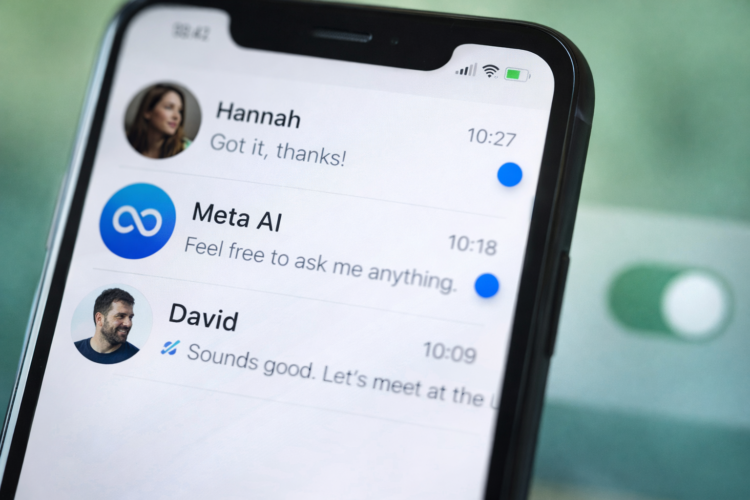
With more than 3 billion global users, WhatsApp remains one of the most widely used messaging platforms in the world. Over the years, the app has introduced several indicators to show message status and new features. One such indicator that has recently gained attention is the WhatsApp blue dot.
The blue dot in WhatsApp can refer to two different things depending on where you see it in the app. In most conversations, it relates to read receipts (blue ticks) that show when a message has been read. Recently, WhatsApp also introduced a blue AI assistant icon linked to Meta AI, which appears as a blue circle in the interface.


Because of these updates, many users are confused about what the blue dot or blue ticks actually indicate, why some people disable them, and how to control these settings. This article explains every important detail about the WhatsApp blue indicator, how it works, and how you can manage it for privacy.
What The WhatsApp Blue Dot Indicates
The most common blue indicator in WhatsApp is the blue tick, which is part of the platform’s read receipt system. This feature helps users know the status of messages they send.
WhatsApp uses three main checkmark indicators to show message progress.
Message Status Indicators In WhatsApp
| Indicator | Meaning | When It Appears |
|---|---|---|
| One Gray Check | Message successfully sent | Appears immediately after sending |
| Two Gray Checks | Message delivered to recipient’s device | Appears when recipient receives it |
| Two Blue Checks | Message has been read | Appears when recipient opens the chat |

When the two gray checkmarks turn blue, it confirms the recipient has opened and read the message.
However, there are exceptions. For example:
- Group chats: Blue ticks appear only after every participant has read the message.
- Voice messages: They can still show blue ticks even if read receipts are disabled.
These indicators help users understand message delivery and interaction without sending additional notifications.
The New WhatsApp Blue AI Dot

Another blue dot seen in WhatsApp is related to Meta AI integration.
The blue circular icon represents Meta’s AI assistant, which lets users:
- Ask questions
- Get writing suggestions
- Plan trips
- Generate quick replies
- Search information directly in chats
This feature appears as a blue ring or dot inside the chat interface, allowing users to start conversations with the AI assistant directly from WhatsApp. Some users appreciate the convenience, while others consider it unnecessary or intrusive.
Why People Disable The WhatsApp Blue Dot (Read Receipts)
Many users choose to disable WhatsApp read receipts, mainly for privacy and communication control.
Here are the most common reasons.
1. Privacy Concerns
The blue ticks reveal when a message has been read, which means senders can track activity. Some users prefer keeping their reading habits private.
2. Avoiding Pressure To Reply
Seeing blue ticks often creates social pressure to respond immediately. Disabling the feature removes this expectation.
3. Better Control Over Communication
Some people read messages but want to respond later. Turning off read receipts allows them to manage conversations on their own schedule.
4. Reducing Social Anxiety
For many users, constant message tracking can lead to stress about response time.
5. Business And Professional Boundaries
Professionals sometimes disable read receipts to maintain communication boundaries when using WhatsApp for work.
Important Facts About WhatsApp Blue Ticks
Here are some key facts every user should know about the WhatsApp blue indicator.
| Fact | Explanation |
|---|---|
| Works both ways | If you disable read receipts, you also cannot see when others read your messages |
| Group chats unaffected | Blue ticks still appear when all group members read the message |
| Voice notes exception | Blue ticks may still appear when voice messages are played |
| Global setting | WhatsApp does not allow enabling read receipts for individual chats |
| Privacy only | Disabling it does not affect WhatsApp’s end-to-end encryption |
WhatsApp remains end-to-end encrypted, meaning message content is private even if read receipts are turned off.
How To Change The WhatsApp Blue Dot Setting
If you want to disable or enable the blue tick feature, you can easily change the setting inside the app.
Steps To Turn Off WhatsApp Blue Ticks (Android & iPhone)
- Open WhatsApp
- Tap Settings
- Go to Privacy
- Find Read Receipts
- Toggle the option Off or On
After turning this setting off:
- Your contacts will not see blue ticks when you read messages.
- You will also not see blue ticks when they read your messages.
This change applies to all individual chats, not just selected conversations.
Future Of WhatsApp Blue Indicators
WhatsApp continues to evolve rapidly. Several future trends may affect how blue indicators work:
- AI Integration Expansion
The Meta AI blue dot may gain more advanced capabilities such as productivity tools and automation. - Improved Privacy Controls
Future updates may offer more granular control, possibly allowing read receipts for specific chats. - Smart Communication Features
WhatsApp may integrate AI to suggest replies based on read messages. - Enhanced Message Insights
Businesses may receive advanced analytics on message engagement in WhatsApp Business accounts.
As messaging apps evolve, privacy and transparency will remain key considerations for users worldwide.
Conclusion
The WhatsApp blue dot or blue tick is a small but powerful feature that shows when messages are read and helps users track communication. While it improves transparency in conversations, many users disable it to protect their privacy or reduce response pressure.
Understanding how the blue indicator system works allows users to manage their messaging experience more effectively. With ongoing updates such as Meta AI integration and enhanced privacy features, WhatsApp will likely continue refining how these indicators function in the future.
FAQs
What Does The Blue Dot Or Blue Tick Mean In WhatsApp?
It indicates that the recipient has opened and read your message, turning the two gray checkmarks into blue ones.
Can I Turn Off The Blue Tick In WhatsApp?
Yes. Go to Settings → Privacy → Read Receipts and toggle the option off.
Do Blue Ticks Work In Group Chats?
Yes. In group chats, blue ticks appear only after every participant has read the message.