


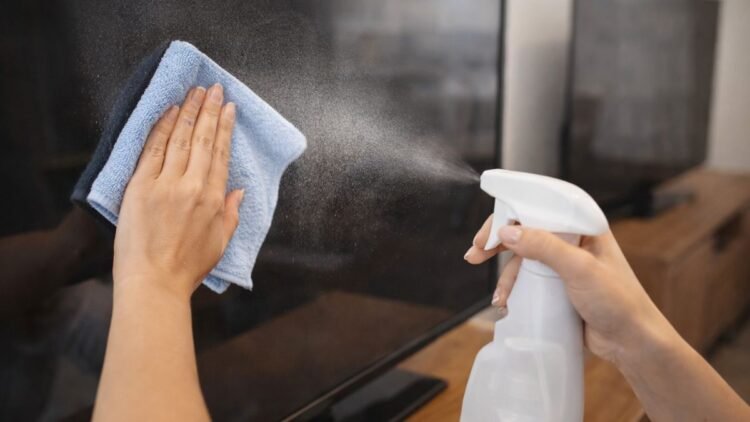
Keeping your TV and computer screens clean is important for both appearance and performance. Over time, screens collect dust, fingerprints, and smudges from the air and everyday use. If left uncleaned, these marks can make it harder to see clearly and may even affect your viewing experience.
However, cleaning electronic screens requires extra care. Using the wrong materials or harsh cleaning chemicals can damage the protective coatings and delicate display surfaces. The good news is that cleaning your screens properly is simple and only requires a few basic tools.
Why Proper Screen Cleaning Matters


Modern TVs, laptops, and monitors have sensitive screens with anti-glare coatings that help reduce reflections from lights and sunlight. These coatings are delicate and can easily be damaged by strong chemicals or abrasive materials.
Using paper towels, glass cleaners, or spraying liquid directly onto the screen may cause scratches or allow moisture to seep into the device. Once the protective coating is damaged, it cannot be repaired.
Proper cleaning techniques help ensure that your devices remain clear, scratch-free, and long-lasting.
Avoid Harsh Cleaners and Sprays

One of the most common mistakes people make is spraying cleaners directly onto their TV or computer screen. Liquids can seep into small openings around the display and potentially damage internal electronic components.
In addition, many household cleaning products contain ammonia, alcohol, or strong chemicals that can remove or weaken the anti-glare coating on screens.
Instead of using glass cleaners, disinfectant sprays, or wipes, it’s best to use minimal moisture and gentle cleaning tools.

For most situations, a dry microfiber cloth is enough to remove dust and light smudges.
Use the Right Cleaning Cloth
Choosing the right cloth is one of the most important steps when cleaning screens. The safest and most effective option is a microfiber cloth.
Microfiber cloths are designed to clean delicate surfaces like camera lenses, eyeglasses, and electronic displays. They trap dust and dirt inside their fibers rather than pushing it across the screen.
Avoid using:
- Paper towels
- Tissues
- Rough cloths
- Cleaning wipes
These materials can scratch the screen or leave lint behind.
If you don’t have a microfiber cloth available, a soft cotton cloth or an old T-shirt can be used in an emergency. However, microfiber cloths remain the best choice because they reduce the risk of scratches.
How to Clean Your Screen Step by Step
Cleaning your screen correctly only takes a few minutes. Follow these simple steps to avoid damage.
1. Turn Off the Device
Always turn off your TV, laptop, or monitor before cleaning it. A dark screen makes it easier to see dust and fingerprints. Turning off the screen also reduces static electricity that attracts dust.
2. Use a Dry Microfiber Cloth
Start by gently wiping the screen with a dry microfiber cloth. Use soft circular motions and avoid applying too much pressure.
Most dust and light smudges will come off easily with this method.
3. Use a Slightly Damp Cloth if Needed
If you encounter stubborn fingerprints or sticky marks, lightly dampen the cloth with a small amount of water. The cloth should be damp, not wet.
Never spray water directly onto the screen.
4. Wipe the Screen Gently
Carefully wipe the affected area until the mark disappears. Afterward, use the dry part of the cloth to remove any remaining moisture.
How Often Should You Clean Your Screens?
There is no strict rule for how often screens should be cleaned. It mainly depends on how quickly dust accumulates in your home.
For most people, wiping down screens once every week or two is enough to keep them clear.
If you live in a dusty environment or frequently touch your screen, you may need to clean it more often.
Keeping a microfiber cloth nearby makes it easy to quickly wipe away dust whenever you notice it building up.
Conclusion
Cleaning your TV and computer screens doesn’t require complicated tools or harsh chemicals. In fact, the safest method is also the simplest—a microfiber cloth and a little water when needed.
By avoiding sprays, paper towels, and strong cleaners, you can protect your screen’s delicate surface and keep it looking clear for years. With just a few gentle wipes every now and then, your displays will stay dust-free, smudge-free, and ready for the best viewing experience.
FAQs
Can I use glass cleaner on my TV or computer screen?
No. Glass cleaners often contain chemicals that can damage the anti-glare coating on modern screens.
What is the safest way to clean a screen?
The safest method is to use a soft microfiber cloth and gently wipe the screen. For stubborn smudges, use a slightly damp cloth.
Is it safe to spray water directly on the screen?
No. Spraying liquid directly onto the screen can allow moisture to enter the device and cause damage. Always apply moisture to the cloth instead.